1. JDBC 알아보기
: 관계형 데이터베이스의 SQL문을 실행시키기 위해서는 commandline 도구를 이용하거나 별도의 툴을 사용해야 한다.
- Java Application -- JDBC -- Database
- 데이터베이스 연결 및 SQL에 대한 작업을 한다. 표준 인터페이스
- 영속성 레이어를 위해 만들어진 최초의 컴포넌트이다.
아키텍처
크게 두 개의 layer로 나뉜다.
- JDBC API
- Connection
- Statement
- ResultSet - JDBC DB Driver
- 4가지 형태의 type이 있다. 대체로 type4가 가장 많이 사용된다.
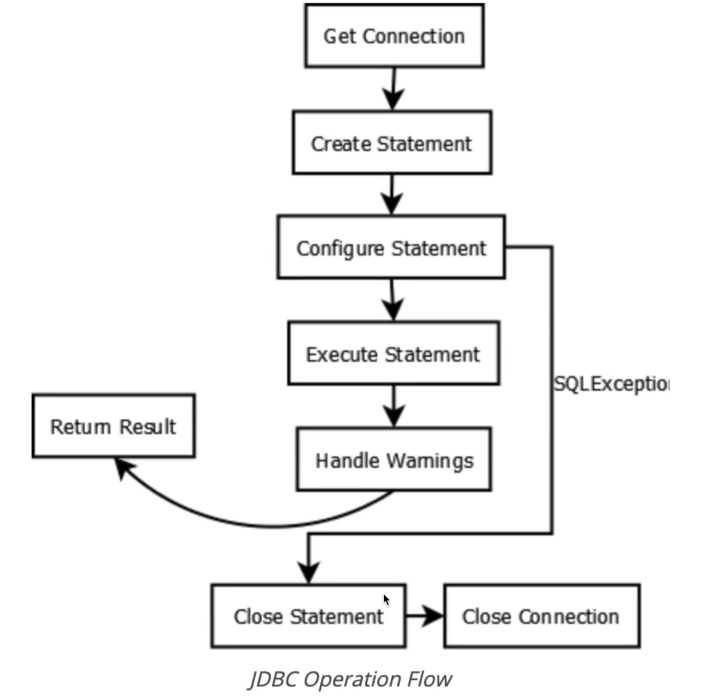
- DriverManager를 통해서 커넥션 객체를 받아온다.
- Connection을 통해서 Statement를 가져온다.
- Statement를 통해서 쿼리를 실행해서 ResultSet을 가져오거나 Update를 실행한다.
- 데이터베이스 커넥션을 종료한다.
3.JDBC CRUD 실습 1
- JDBC 커넥션을 하려면 Driver가 있어야 한다.
- pom.xml에서 드라이버를 추가해준다.
<dependencyies>
	<dependency>
    	<groupId>mysql</groupId>
        <arifactId>mysql-connector-java</arifactId>
        <scope>runtime</scope>
    </dependency>
</dependencyies>
- 코드 상에 절대 아이디, 패스워드가 들어가면 안된다.
- 데이터베이스는 리소스이기 때문에 쿼리를 실행하면 꼭 닫아줘야 한다.
public class JdbcCustomerRepository {
	private static final Logger logger = LoggerFactory.getLogger(JdbcCustomerRepository.class);

    public static void main(String[] args) {

    	// 커넥션은 예외가 생겼을 때 닫아줘야 한다.
    	Connection connection = null;
        Statement statement = null;
        ResultSet resultSet = null;
        try {
    		connection = DriverManager.getConnection("url", "user", "password");
            statement = connection.createStatement();
            resultSet = statement.executeQuery("query");
        } catch(SQLException throwables) {
        	logger.error(throwables)
        	throwables.printStackTrace();
            throw throwable;
        } finally {
        	try {
            	if (connection != null) connection.close();
           		if (statement != null) statement.close();
                if (resultSet != null) resultSet.close();
            } catch (SQLException exception) {
            	logger.error(exception)
            }

        }

    }

}
- 자바 10부터는 try 문이 자동으로 닫아준다.
- AutoCloseable
public class JdbcCustomerRepository {
	private static final Logger logger = LoggerFactory.getLogger(JdbcCustomerRepository.class);

    public static void main(String[] args) {

        try (
    		var connection = DriverManager.getConnection("url", "user", "password");
            var statement = connection.createStatement();
            var resultSet = statement.executeQuery("query");
        ) {
        	// resultSet을 사용한다.
        } catch (SQLException exception) {
            	logger.error(exception)
        }

    }

}
- localDateTime으로 바꿔주는 것이 중요하다.
- 웬만하면 prepareStatement를 사용하는 것이 좋다.
- select, inset문을 사용해보자.
private final String INSERT_SQL = "INSERT INTO customers(customer_id, name, email) VALUES (UUID_TO_BIN(?), ?, ?)"
public int insertCustomer(UUID customerId, String name, String email) {
	try (
    	var connection = DriverManager.getConnection();
        var statement = connection.prepareStatement(INSERT_SQL);
    ) {
    	statement.setBytes(1, customerId.toString().getBytes());
    	statement.setString(2, name);
        statement.setString(3, email);
        return statement.exetuteUpdate();
    } catch (SQLException throwable) {
    	logger.error(throwable);
    }
    return 0;
}
- 테이블의 모든 customer를 지워보자.
private final String DELETE_ALL_SQL = "DELETE FROM customers";
public int deleteAllCustomers() {
	try (
    	var connection = DriverManager.getConnection();
        var statement = connection.prepareStatement(INSERT_SQL);
    ) {
        return statement.exetuteUpdate();
    } catch (SQLException throwable) {
    	logger.error(throwable);
    }
    return 0;
}
- UUID를 입력할 때와 출력할 때가 다르다?
-> 제대로 들어가기는 했다. select BIN_TO_UUID(customer_id) from customers;
-> 조회할 때 생뚱맞은 아이디가 리턴?
-> UUID 버전이 다르다.
var byteBuffer = ByteBuffer.wrap(resultSet.getBytes("customer_id"));
var customerId = new UUID(byteBuffer.getLong(), byteBuffer.getLong());
'2023 활동 - 4학년 > [1월 ~ 4월] sw 아카데미 백엔드 과정' 카테고리의 다른 글
| [2023.03.13 / CNU SW Academy] 48일차 회고록 (0) | 2023.03.14 |
|---|---|
| [2023.03.09 / CNU SW 아카데미] SpringBoot Part2 D-23 (0) | 2023.03.09 |
| [2023.03.08 / CNU SW 아카데미] SpringBoot Part2 D-21 (0) | 2023.03.08 |
| [2023.03.03 / CNU SW 아카데미] 42일차 회고록 (0) | 2023.03.05 |
| [2023.03.02 / CNU SW 아카데미] SpringBasic Part1 D-20 (0) | 2023.03.02 |


